
|
|
| Simulators | Information | Links |
I have updated my enigma code/decode simulator as a more user friendly, Windows 95+ version. This application (a screen shot shown at below and to the right) simulates the World War II German Navy Enigma which used four of six wheels to encode and decode a message.
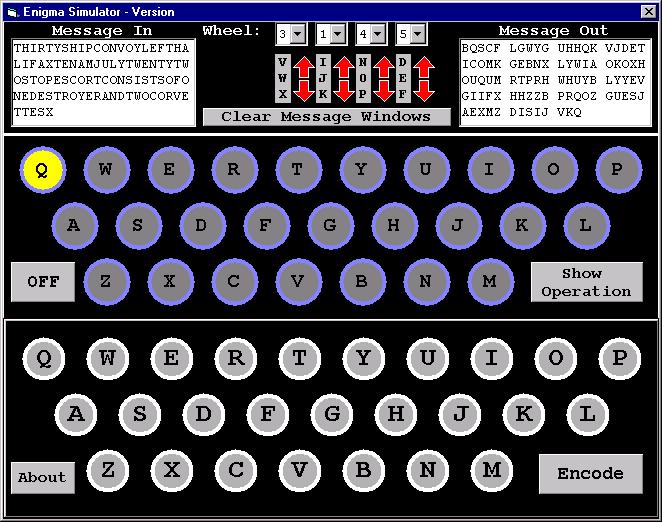
This application was written in Visual Basic and consists of four major parts. The first part is the "keyboard" at the lower third of the graphic from which either the PC keyboard can be used to enter a message or the keys are clicked on using the mouse.
The middle section of the display is the array of lights used to indicate what is the encoded value for the pressed key is. For the example shown, the key "X" is translated into "Q". Along with this display, the boxes in the top left and right hand corners present the entered data along with the encrypted result, respectively. Note that the encoded data is display in groups of five, just as the actual Enigma messages were transmitted.
Four wheels can be selected out of six for this simulation. The control in the middle of the top section of the simulation is used to select the wheels used by the application as well as their starting position.
There are five buttons on the simulation. The most important is the "Encode"/"Decode" button which is used to select what is the operating mode used by the simulation. Once a message is "Encoded", it must be "Decoded" with the same starting setting for the application. The "Show Operation" button expands the simulation to show the operation of the wheels and how the selected letter passes through the wheels to be encoded. The "About" button opens up a window that explains the operation of the application as well as has the copyright information. "Clear Message Windows" clears the two message windows in the top left and right hand corners of the display. This function is useful for when you want to create a new message. Lastly, the "OFF" button ends the simulation.
To use the simulation, select the wheels to be used from the wheel pull downs and set their initial positions using the up and down arrows adjacent to the three letter display.
For example, select the "6", "3", "5" and "4" wheels (from left to right) and set their initial positions to "K", "A", "N" and "E". Now, key in the text string:
This is a test message.
The simulation will ignore the spaces, capitalization and period at the end of the string and produce the encoded message:
KZBMD OXRDS UOHWX GML
To decode the message, reset the intial positions of the six wheels to "K", "A", "N" and "E" and click on the "Encode" button which will change to "Decode". When the eighteen character message is keyed in, the following message will be displayed:
THISI SATES TMESS AGE
The wheel letter combinations are very simplistic and only have swap letters based at one point. The actual enigma box itself used five points for letter swaps and for this reason you may see consecutive letters replacing repeated letters in the original message. I have not done any kind of organized verification of this application and while I haven't seen any problems with the data produced by it (I have always "decoded" it to ensure it is correct), I cannot guarantee that it will work under all conditions.
The application is quite large (over 3 MB) due to the number of graphics built into it. This application cannot be distributed, except through this web page - the reason for specifying this is to allow a count to be made of the number of copies that are being used.
Download Microsoft Windows Enigma Simulator Package
After the enigsim.zip application has been downloaded, it should be unzipped (using the "open" option on download instead of "save") and the three files should be saved in a temporary directory. After the three files have been saved in the temporary directory, "setup.exe" should be executed (from within the "My Computer" dialog box, an "MS-DOS Prompt" or using the "Run..." button from the Start bar).
After "setup.exe" has finished running, the Enigma Simulator will be available via "Start" -> "Programs" and can be initiated by simply clicking on the selection. When the application first comes up, the wheels "4", "3", "2" and "1" are set up with all starting at "A" - when experimenting with the simulation, the wheels and starting letters should be changed for your own messages.
To delete the simulator from your hardfile, click on "Start" ->. "Settings" ->. "Control Panel" and initiate "Add/Remove Programs". Select the Enimga simulator from this application and click on "Add/Remove..." to remove the application from your hardfile.
As another version of the Visual Basic code, the MS-DOS "C" application listed below, which was originally written in BASIC twelve years ago. This code only uses three wheels in a set position and can be used to encode/decode a message as well as pass an encrypted string to it to figure out the initial position of the wheels used to encode the message. To decode a message, the code requires about a second on a 150 MHz Pentium processor to figure out the initial settings.
Extrapolating, to decode a "true" Enigma message (with three of six wheels to choose from) the application would take about two minutes to run (which is a remarkable improvement over the original "engines" that would take six months on average to figure out the wheels and their initial positions from a message).
Download MS-DOS enigma.exe Simulator Application
//  Enigma.C - Simple "Enigma" Machine Encrypt/Decrypt machine
//
//  Myke Predko - 98.02.10
//
//  This code runs a Simple (Three Wheel) version of the WW2 German
//   "Enigma" Machine with a brute force decryption algorthim to
//   demonstrate how fast data can be decrypted by a Pentium Class
//   PC.
//
//

#include "stdio.h"		//  stdio.h In quotes so it will
 					//   show up in html.


//  Define Message Strings Along with the Variable Messages
int i, j, k, n;

// Letter Positions:ABCDEFGHIJKLMNOPQRSTUVWXYZ

char Wheel_1[26] = "ZYXWVUTSRQPOMNLKJIHGFEDCBA";  //  Reverse Letters

char Wheel_2[26] = "BADCFEHGJILKNMPORQTSVUXWZY";  //  Translate Up 13

char Wheel_3[26] = "FGHIJABCDEPQRSTKLMNOXYZUVW";  //  Blocks of 5


char far * Msg    = "CANTHISBEDECODED";  //  Message to be encoded/
char far * Encode = "canthisbedecoded";  //   decoded.
     	                           //  "Encode" points to space for Msg


//  Define the Wheel Operations
char Encode1( char Input )
{                               //  Convert the Letter using "i"

  return Wheel_1[( i + Input - 'A' ) -
                                    (( i + Input - 'A' ) / 26 * 26 )];

}  //  End Encode1

char Encode2( char Input )
{                               //  Convert the Letter using "j"

  return Wheel_2[( j + Input - 'A' ) -
                                    (( j + Input - 'A' ) / 26 * 26 )];

}  //  End Encode2

char Encode3( char Input )
{                               //  Convert the Letter using "j"

  return Wheel_3[( k + Input - 'A' ) -
                                    (( k + Input - 'A' ) / 26 * 26 )];

}  //  End Encode3

char ReadDecode( Input )
{                               //  Figure out what the Character is
                                //   For Input, i and j

char retvalue;                  //  Character to be Returned
int  count;

  for ( count = 0; Wheel_3[ count ] != Input; count++ );

  if (( count = count - k ) < 0 )
    count += 26;                //  Get a Valid Character Position

  retvalue = count + 'A';       //  Convert to ASCII

  for ( count = 0; Wheel_2[ count ] != retvalue; count++ );

  if (( count = count - j ) < 0 )
    count += 26;

  retvalue = count + 'A';       //  Convert to ASCII

  for ( count = 0; Wheel_1[ count ] != retvalue; count++ );

  if (( count = count - i ) < 0 )
    count += 26;

  return count + 'A';

}  //  End ReadDecode

EnigmaInc()                     //  Rotate the Wheels
{

    if ( ++i > 25 ) {           //  Now, Rotate the Wheels
      i = 0;                    //  "i" is Rolling Over
      if ( ++j > 25 ) {
        j = 0;
        if ( ++k > 25 )
          k = 0;
      }  //  endif
    }  //  endif

}  //  End EnigmaInc


main()
{

int Wheel_1Start = 16;          //  Set the Initial Wheel Positions
int Wheel_2Start = 25;          //   As part of the Code
int Wheel_3Start = 17;

  i = Wheel_1Start;             //  Setup the Checking Parameters
  j = Wheel_2Start;
  k = Wheel_3Start;

  for ( n = 0; n < strlen( Msg ); n++ ) {
    Encode[ n ] = Encode3( Encode2( Encode1( Msg[ n ])));
    EnigmaInc();                //  Get the Encrypted Character
  }  //  endfor

  printf( "\"%s\" is encoded into \"%s\"\n", Msg, Encode );


//  "Encode" is loaded with the Encoded Message

  for ( i = 0; i < 26; i++ )    //  Now, Find "i", "j" and "k" to
    for ( j = 0; j < 26; j++ )  //   Decrypt
      for ( k = 0; k < 26; k++ ) {
        Wheel_1Start = i;         //  Save Starting Values for Looping
        Wheel_2Start = j;
        Wheel_3Start = k;
        for ( n = 0; ( n < strlen( Msg )) &&
                      ( Msg[ n ] == ReadDecode( Encode[ n ])); n++ ) {
          EnigmaInc();
        }  // endfor
        if ( n == strlen( Msg ))
          printf(
            "Decode Wheel Positions: 1 -> %i, 2 -> %i, and 3 -> %i\n",
                           Wheel_1Start, Wheel_2Start, Wheel_3Start );
      i = Wheel_1Start;         //  Restore the Wheel Values
      j = Wheel_2Start;
      k = Wheel_3Start;
    }  //  endfor

}  //  end Enigma